Cybersecurity in schools is usually discussed as if every school had an IT department. In reality, many small and mid-sized schools don’t. The network is looked after by an administrator, a volunteer who comes in on Fridays, or an office manager who became the person everyone calls when the Wi-Fi drops.
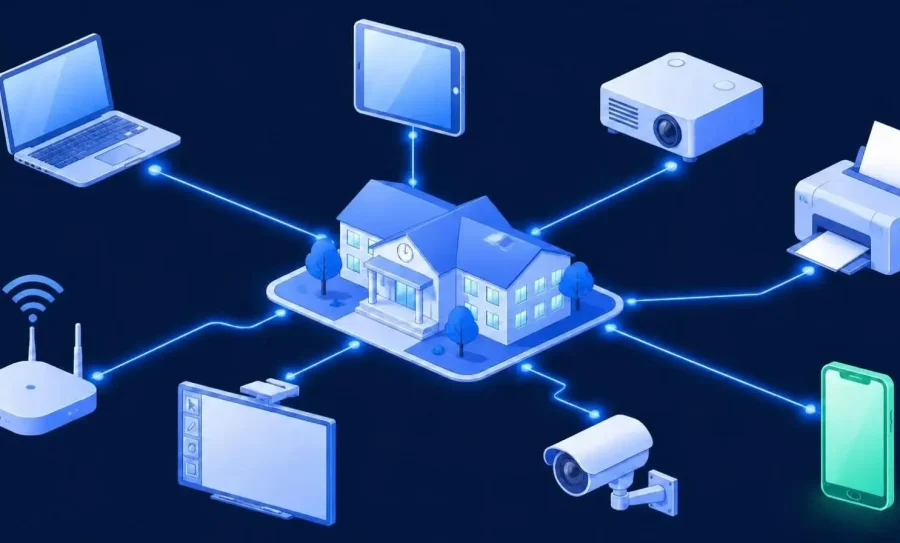
Meanwhile, the network keeps getting busier: laptops, student phones, guest Wi-Fi, smart boards, cameras, printers and building systems. Before firewalls and phishing training, there is a simpler question: do you know what is connected to your network right now?
This guide is for the people who keep a school’s network running, whether or not IT is their main job. We’ll look at where the exposure really sits, give you a practical checklist you can follow without a large team, and point to the free help available today.
The state of school cybersecurity in 2026
Education cybersecurity is a challenge of scale and resources. Schools of every size remain a frequent target because they hold sensitive student and staff data and depend on systems that can’t be offline for long. The Center for Internet Security reports that 82% of K-12 schools experienced a cybersecurity incident between July 2023 and December 2024.
The resources available to schools have also evolved. Some long-standing services now work on a membership basis, and new free guidance has been published. We cover both in the section on support below.
Common security issues in schools
Most incidents don’t start with an exotic attack. They start with an ordinary gap:
- Unmanaged and personal devices. Student phones, staff laptops and visitor devices join the Wi-Fi every day.
- IoT and building systems. Cameras, access control, printers and displays are rarely updated and often forgotten.
- Unknown devices. Equipment plugged in by a teacher, left over from a previous project, or set up by a vendor and never documented.
- Weak or shared credentials. Shared accounts and stale logins for former staff and students.
- One network for everything. Students, staff, guests and critical systems all share the same space.
What these have in common is visibility. You can’t update, separate or monitor something that isn’t on your list.
The real exposure: devices you don’t know about
An unknown device is a risk for the simple reason that nobody is responsible for it. It isn’t in any inventory, it isn’t updated, and it isn’t covered by any policy. In a school the problem is amplified: devices change every term, summer maintenance brings in new equipment, and bring-your-own-device is part of daily life.
It also shows up in ways that don’t look like security at first. A projector sits offline for days because nobody noticed. The Wi-Fi slows down during an exam because personal devices crowd the same network as classroom equipment. A tablet goes missing, and nobody can say whether it was ever on the network. These are visibility problems, and they are also the ones attackers take advantage of.
That’s why asset inventory is a starting point in the main security frameworks. It is Control 1 in the CIS Controls, and Asset Management (ID.AM) is the first category under the Identify function of the NIST Cybersecurity Framework 2.0. You don’t need to adopt a framework to use the idea: a complete list of what’s connected is the first thing any of them asks for.
In practice, visibility means:
- Discovering every device on the network, wired and wireless, including IoT.
- Identifying what each device is: type, manufacturer, and where it connects.
- Spotting what’s new or unexpected, so unknown devices are caught early.
- Keeping the picture current, because a list built once goes stale within weeks.
How Fing helps. A single scan with the free Fing Desktop gives you a complete inventory of what’s connected: projectors, tablets, printers, access points and the personal devices on your Wi-Fi (device discovery). Fing Professional then adds continuous monitoring: you get an instant alert by mobile or email when a device goes offline or appears online (alerts and monitoring), and you can block or limit unknown devices before they slow the network down for everyone (block and control).
A practical checklist for network security in schools
If you’re deciding where to start, this order works well when you don’t have a large team:
- Discover and inventory every device. Build a complete picture of what’s on the network, including IoT.
- Deal with the unknowns. For every device you don’t recognize, decide whether to keep it, isolate it, or remove it.
- Separate what matters. Keep guests and student devices apart from staff and critical systems, so a problem in one area stays contained. The simplest way for a small school is a separate guest Wi-Fi network, which most routers and access points support. Just check that it is isolated from the main network, not simply a second Wi-Fi name on the same one.
- Protect credentials. Use multi-factor authentication for staff, enforce strong unique passwords, and remove stale accounts. CISA’s K-12 guidance puts protecting the login credentials of students and staff among its core objectives.
- Keep software and firmware updated. Include the IoT devices that usually get missed.
- Back up critical systems and test the restore. It’s your safety net if ransomware gets through.
- Monitor for change. New devices, devices dropping offline and unexpected connections are early warning signs.
- Write a simple plan and rehearse it. Who do you call if the network goes down or something looks wrong? CISA’s free K-12 guides can help you structure it.
These steps are also a solid base for IT security for schools of any size: they don’t require a large team, just a clear order of priorities.
What support exists today
Several education cybersecurity resources are available to US schools, and the terms have changed recently, so check each source for current details.
CISA’s K-12 guidance. On August 12, 2026, CISA released a free collection of K-12 cybersecurity resources. It includes a getting-started guide for school leaders who aren’t security specialists, and a longer implementation guide for those who run cybersecurity day to day. For a small school, the first one is a good place to start.
MS-ISAC. The Multi-State Information Sharing and Analysis Center moved to a fee-based membership model for state and local organizations after September 30, 2025. Pricing is tied to the organization’s operating budget, with discounts or free access offered to smaller organizations. Some states also sponsor access: California, for example, offers MS-ISAC at no cost to qualified public agencies, including schools.
The FCC Cybersecurity Pilot Program. This is a three-year program of up to $200 million, separate from E-Rate. Its participants were selected in January 2025 and no new participants are being added, so it isn’t something schools can apply to today. If your school or district is already a participant, confirm eligibility with your E-Rate contact or USAC before purchasing anything.
FAQ
How do schools protect student data and devices from cyber threats?
Through layered measures: a complete device inventory, separating guest and student devices from critical systems, strong credential protection, regular updates, monitoring, and tested backups. The first layer, knowing what’s connected, makes the others far more effective.
What is the first step in school network security?
Know what’s on your network. An up-to-date inventory of every device, including personal and IoT devices, is the foundation for updating, separating and monitoring.
Do you need a dedicated IT team to keep a school network secure?
Not necessarily. Many small schools are looked after by an administrator, a volunteer or a teacher with some tech skills. Start with a complete device inventory and simple alerts, and add structure as you grow. Tools built for non-specialists, like Fing, show every device in plain language, so you don’t need command-line skills or special training to get started.
Where can small schools find free cybersecurity guidance?
CISA published a free collection of K-12 cybersecurity resources in August 2026, including a getting-started guide for school leaders who aren’t security specialists. MS-ISAC is available through a membership model with discounts or free access for smaller organizations, and some states sponsor membership for local schools. Check your state’s program for current terms.
Does Fing offer special pricing for schools?
Yes. Verified education institutions qualify for a permanent discount on Fing Professional. You apply from your school email address, and verification takes a couple of working days.
Know what’s on your school network
Start with a free scan using Fing Desktop. When you’re ready for continuous monitoring, Fing Professional covers up to 3 networks, with add-on packs for larger campuses, and verified education institutions qualify for a permanent education discount. Fing is SOC 2 Type II certified, which helps when your school has vendor security requirements.