Home network monitoring
See what’s on your network. Block what isn’t yours
Your router shows you very little. Fing is home network monitoring software that shows every device on your home or home office network, alerts you the moment something unfamiliar joins, and lets you block it.
- Device blocking and continuous monitoring are included in paid plans.
Rated 4.5+ by home users everywhere
Join the people who check their network with Fing every day, with over 860,000 reviews worldwide.


What your router doesn’t tell you
Four common problems on home and home office networks, and how Fing solves each one.
The challenges
A router that shows too little
Your router lists a few names and addresses, and the controls your provider gives you are limited.
Unfamiliar devices joining unnoticed
A new device can join your Wi-Fi at any time, and you’d only find out if you happened to look.
No one watching while you’re away
Problems don’t wait until you’re back, and a switched-off laptop can’t warn you about anything.
Wi-Fi that slows down or drops
Calls freeze and pages crawl, and without data it’s hard to know when it started or how often it happens.
How Fing helps
Every device, identified
Fing recognizes each device by type, brand and model, so you can tell at a glance what belongs.
Alerts, then block
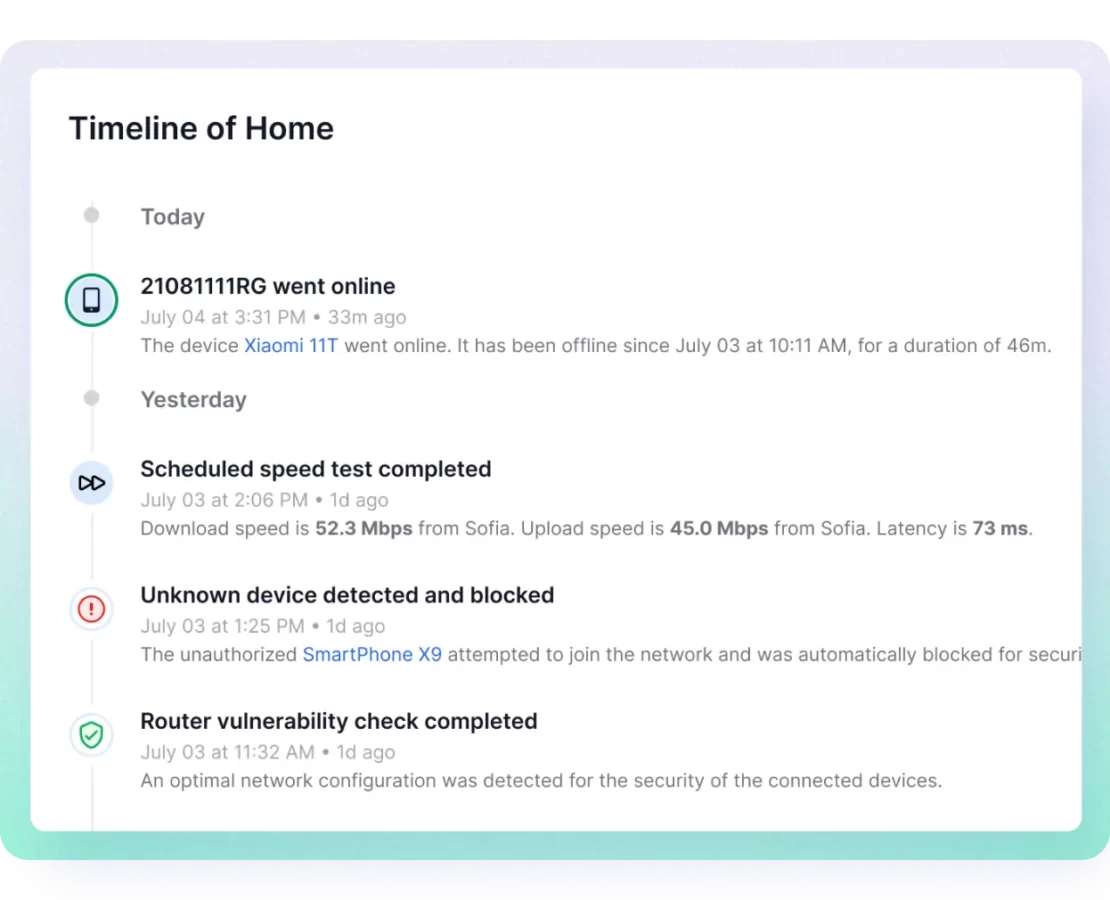
Get notified the moment something new joins your network, and block it if it isn’t yours.
Always-on monitoring
Fing Agent on a Raspberry Pi, NAS or Docker host keeps watching and alerts you when you’re away.
Internet performance, tracked
Fing tracks your Internet performance in real time, so you can spot lags and drops as they happen.
DEVICE DISCOVERY
See everything connected to your network
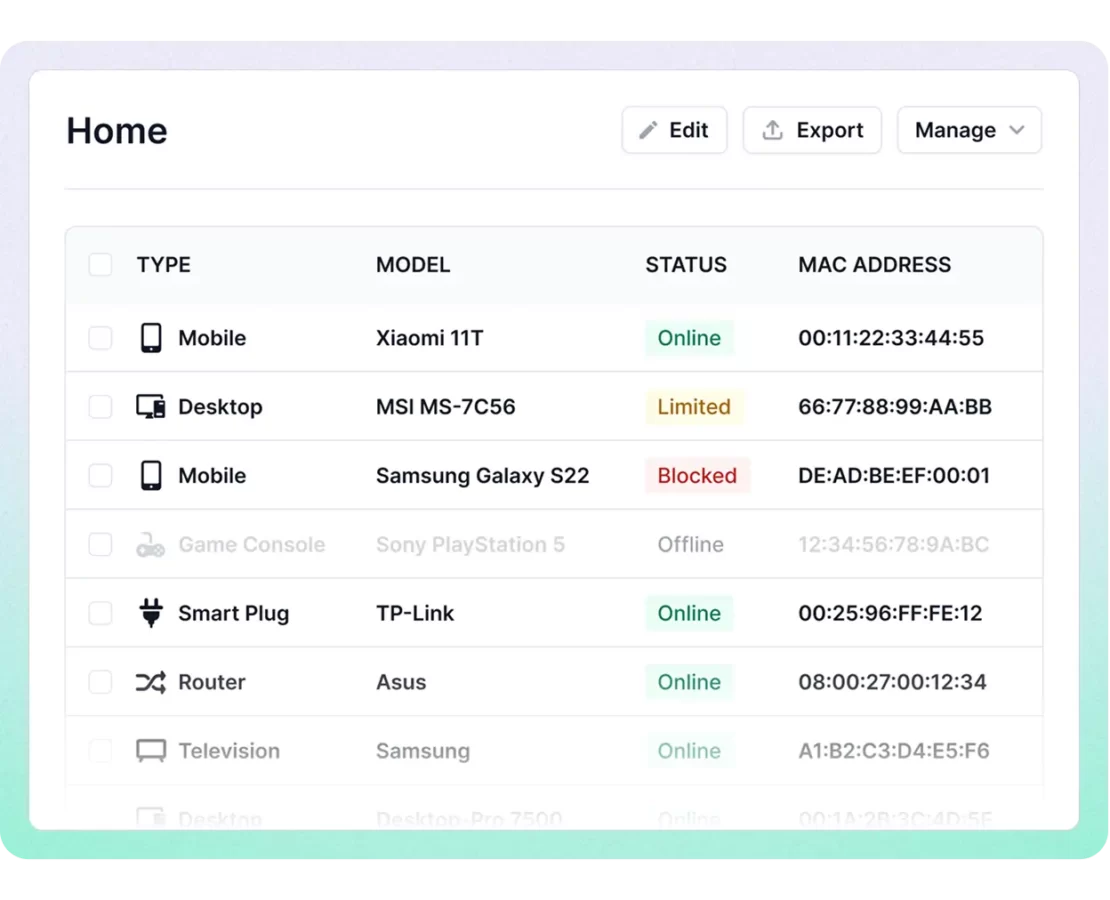
Fing lists every device with its type, model, status and MAC address, so an unfamiliar one stands out right away. Export the list whenever you need it.
BLOCK & CONTROL
Keep unknown devices off your network
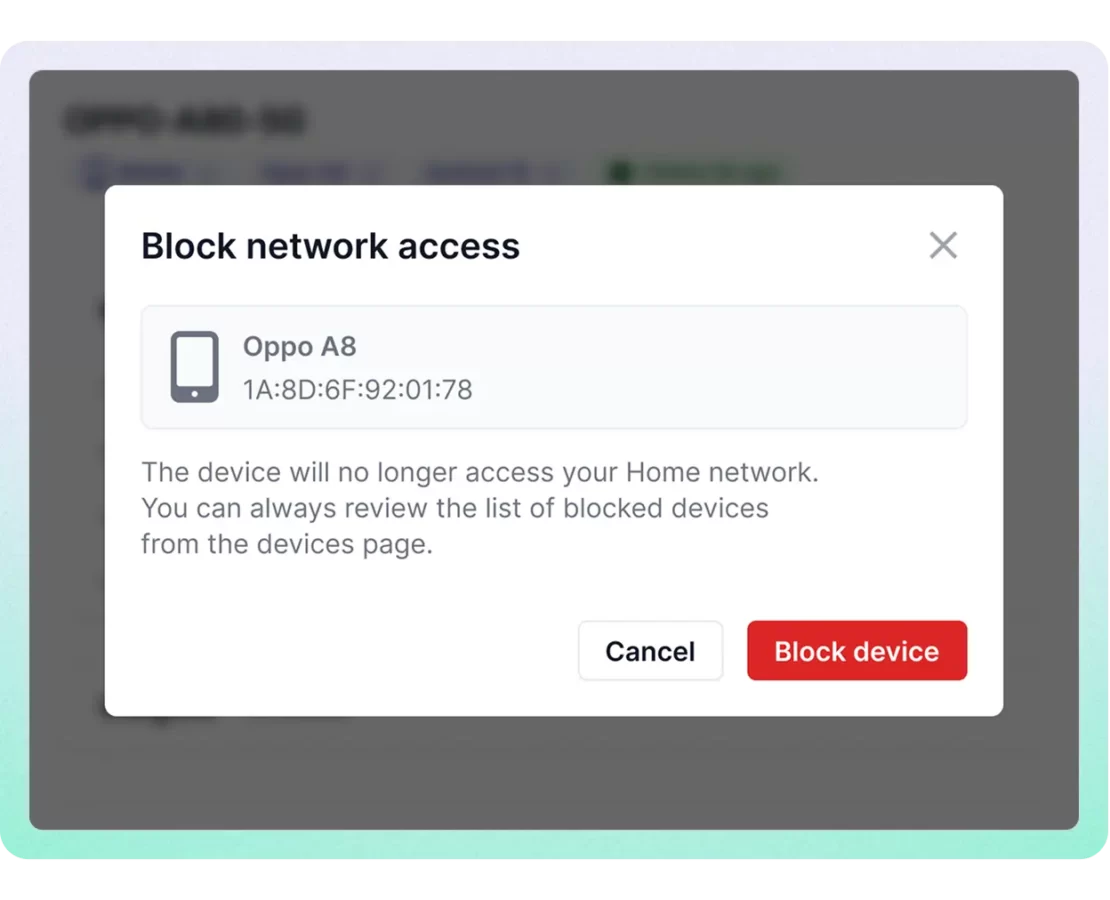
Block any device you don’t recognize, or let Fing do it for you: with auto-block, new unknown devices are blocked as soon as they try to join. You can review the list of blocked devices whenever you want, and set schedules to limit access on specific devices, for work, parental control or quiet nights.
HOME INTERNET MONITORING
Fix Wi-Fi issues before they ruin your day
Fing monitors your home Internet connection: it runs speed tests on a schedule and keeps a timeline of everything that happens on your network, so you can see when your connection dropped and what changed.
Choose how you use Fing
Start with a scan on your computer. Add an always-on monitor when you want Fing to keep watching.
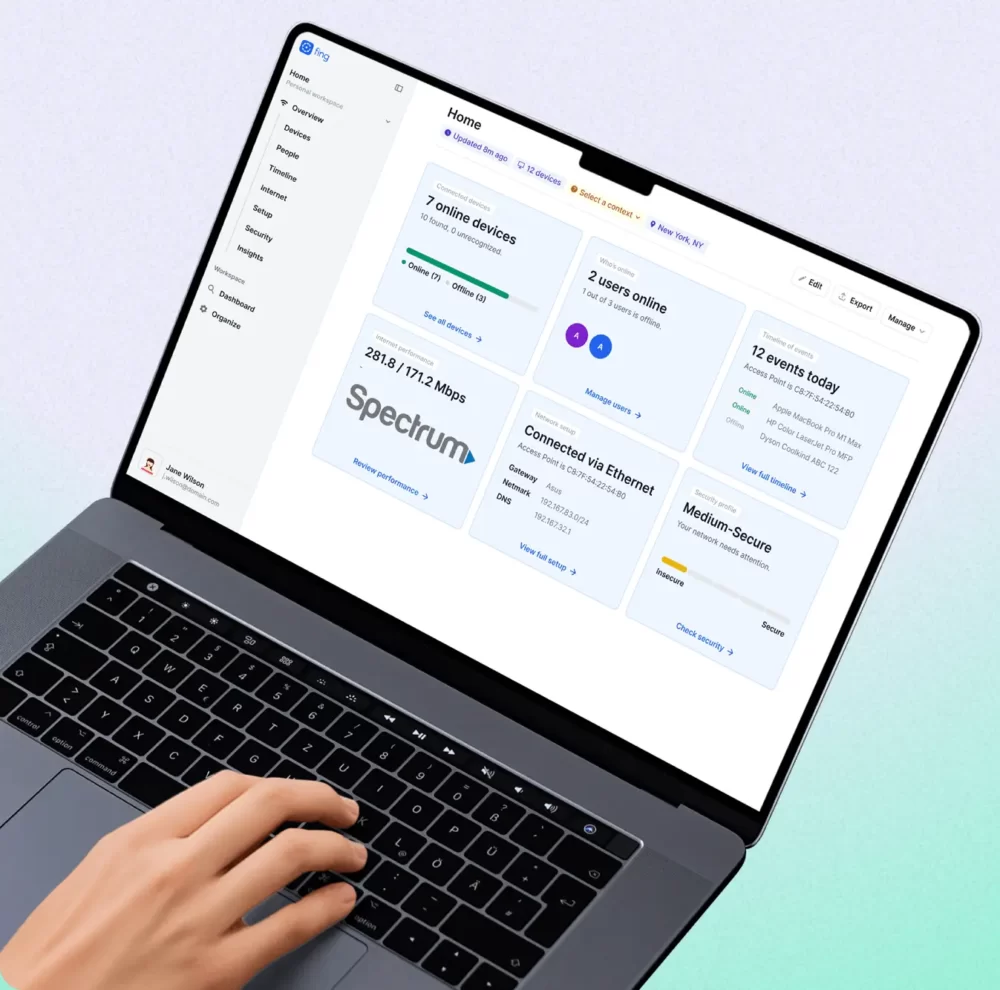
Fing Desktop
Run a scan from your Windows or Mac computer and see everything on your network in minutes. Free to download, with Premium for continuous monitoring and device blocking.
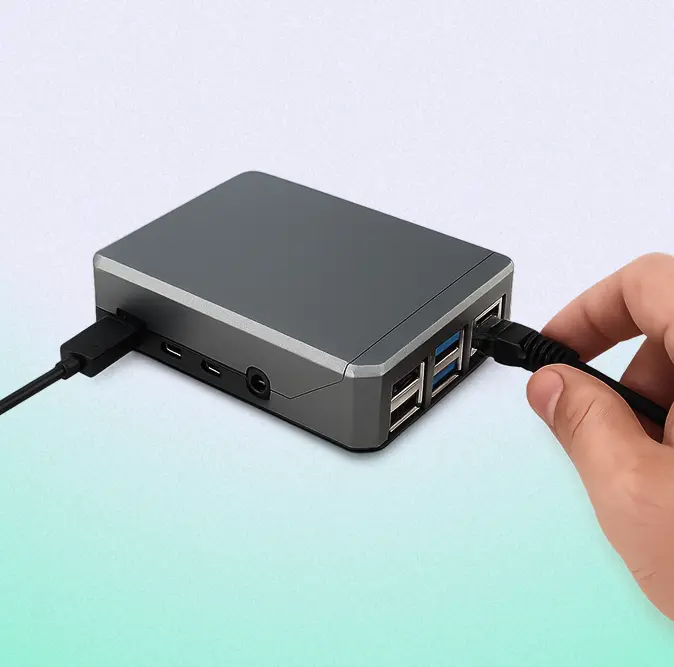
Fing Agent
A lightweight, always-on monitor for a Raspberry Pi, Docker host or NAS at home. It keeps watching around the clock and alerts you on your phone or by email, even when your computer is off.
Start free, upgrade when you need more
Begin with a free scan. Move up when you want Fing to watch your network for you.
Free
See everything connected to your network
Free to download
- Scan your network manually
- See every device connected to it
Premium
Let Fing watch your network for you
Everything in Free, plus:
- Continuous monitoring
- Block unknown devices, manually or automatically
- Alerts on your phone and by email
Professional
Organize your networks, connect your tools
Everything in Premium, plus:
- 3+ monitored networks
- Workspaces to keep your networks organized
- Cloud API and MCP to connect Fing to your own tools
Working from home?
Your work laptop shares the same Wi-Fi as everything else at home. Fing shows you what’s on it and keeps watching when you’re away.
Check every device, down to the MAC address
See each device with its type, brand, model, IP and MAC address, and confirm that every one is yours.
Check your router for weak spots
Run an advanced vulnerability check on the router that connects your work devices to the Internet.
Get alerts when you’re away
Fing Agent keeps monitoring around the clock and alerts you on your phone or by email, even with your computer off.
Watch more than one network
Watch your home office and other networks from a single account and see them all in one place.
Fing Professional
When your home network is also your workplace
Professional includes everything in Premium, plus 3+ monitored networks, workspaces to keep them organized, and Cloud API and MCP to connect Fing to your own tools.
Frequently asked questions
What does home network monitoring software do?
Home network monitoring software shows you every device connected to your network and keeps watching for changes, so you notice when something new joins. With Fing you can see each device’s type, brand, model, IP and MAC address, get alerts when something unfamiliar appears, and block devices you don’t recognize.
Is Fing’s home network monitoring software really free?
Yes. You can download Fing Desktop for free, scan your network manually and see every device connected to it. Continuous monitoring, device blocking and alerts on your phone and by email are included in the paid plans, Premium and Professional.
What’s the difference between Premium and Professional?
Premium is for keeping your home network under watch: continuous monitoring with Fing Desktop or Fing Agent, blocking of unknown devices (manually or automatically), alerts on your phone and by email, and up to two monitored networks. Professional includes everything in Premium and adds 3+ monitored networks, workspaces to keep them organized, and Cloud API and MCP to connect Fing to your own tools.
I got an alert about an unknown device. What should I do?
Don’t panic: a new device is often something of your own, like a new phone, a guest’s laptop or a smart plug. Open the device in Fing and compare its type, brand, model, IP and MAC address with the devices you know. If it isn’t yours, block it and it will no longer be able to access your network. You can review the list of blocked devices at any time. With Premium, you can also turn on auto-block, so new unknown devices are blocked as soon as they try to join.
Do I need to keep my computer on to monitor my home network?
Yes. Monitoring runs while Fing Desktop is running on your computer. To keep watching around the clock, you can use Fing Agent, a lightweight monitor that runs on an always-on device such as a Raspberry Pi, a NAS or a Docker host. It keeps monitoring and sends you alerts even when your computer is off. Continuous monitoring, with Desktop or Agent, is included in Premium and Professional plans.
Can I monitor more than one network?
Yes. Premium lets you monitor up to two networks. Professional starts at three, can be expanded with the annual plan, and adds workspaces to keep all your networks organized in one place.
Find out what’s really on your Wi-Fi
Download Fing Desktop for free and run your first scan. Upgrade when you want Fing to keep watching for you.