We’re excited to share some news many of you have been waiting years to hear: Fing for iOS can read MAC addresses again.
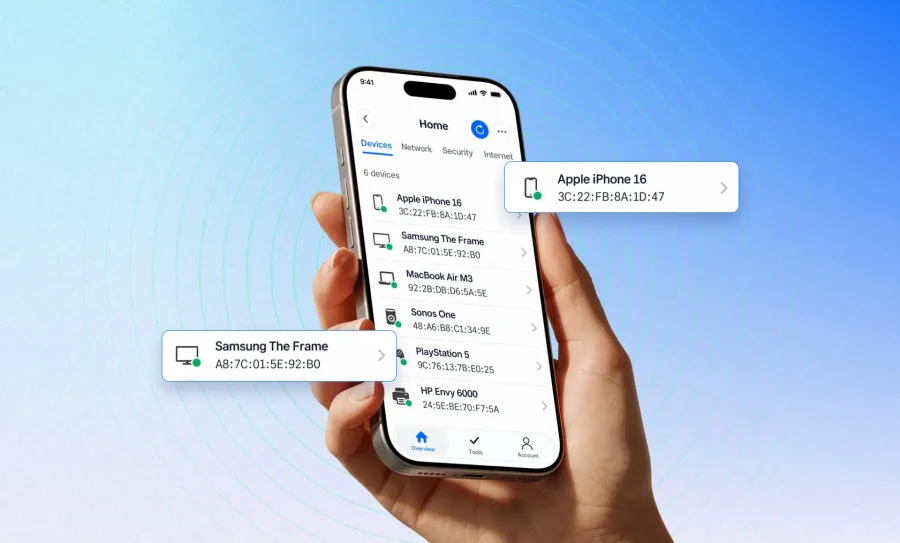
With iOS 27, Apple lets apps access MAC addresses again, and Fing now takes full advantage of it. If you scan your network from an iPhone running iOS 27, you’ll get sharper device recognition: more brand names, more device types, and far fewer generic entries. It’s available now starting from version 12.13.5.
Please note: MAC address recognition requires iOS 27 or later. If your iPhone is running an earlier version of iOS, Fing will keep using IP address recognition.
What changes for iOS users
A MAC address is the hardware identifier of a device’s network adapter, and it’s the best clue for figuring out what is actually connected to your network. With it back in the picture, Fing for iOS can:
- Recognize devices more accurately. Less generic labeling, more precise brand and model details.
- Tell devices apart reliably. A phone that gets a new IP address is no longer mistaken for a brand-new device.
- Spot unknown devices faster. When recognition is accurate, anything suspicious stands out.
- Track devices over time. Online and offline status becomes more dependable.
All new scans use MAC address recognition automatically. For networks you’ve already scanned, Fing will ask whether you’d like to switch from IP address recognition to MAC address recognition, so you always stay in control.
A long road back, supported by nearly 30,000 of you
Some of you will remember why this feature disappeared. In 2017, iOS 11 blocked third-party apps from accessing MAC addresses. Network tools like Fing had always relied on them to show every device on a Wi-Fi network, so we had to adapt and switch to IP address recognition. It did the job, but it was never as accurate: IP addresses change all the time, and they say very little about what a device really is.
We never thought that was the right trade-off. Privacy and powerful network tools can coexist, so we launched a petition asking Apple to let approved networking apps access MAC addresses, either through an app entitlement program or by giving users a choice. The petition didn’t change things at the time, but nearly 30,000 of you signed it, and your support mattered. Almost ten years later, MAC address recognition is finally back. Thank you for standing with us.
How to get MAC address recognition
Getting set up takes just a few taps:
- Update your iPhone to iOS 27 or later.
- Update Fing from the App Store to version 12.13.5 or later.
- Open the app and run a network scan: all new scans use MAC address recognition automatically.
- For networks you’ve scanned before, Fing will ask if you want to switch from IP address to MAC address recognition. Say yes to get the improved results.
That’s it: no extra settings to dig through. Update, run a scan, and see what’s really on your network. We can’t wait to hear what you think.
Frequently Asked Questions
Does Fing for iOS show MAC addresses now?
Yes, as long as your iPhone is running iOS 27 or later. From version 12.13.5, Fing for iOS can read and display MAC addresses for the devices it discovers on your network.
What if I’m not on iOS 27?
Fing will keep using IP address recognition on earlier versions of iOS, as it has until now. Update to iOS 27 to get MAC address recognition.
Do I need to pay for MAC address recognition?
No. MAC address recognition is available to all iOS users, free and paid.
Why does a MAC address improve device recognition?
The first part of a MAC address identifies the manufacturer, which helps Fing label devices accurately. IP addresses can change at any moment and tell you nothing about the device itself. Curious to learn more? Read our guide on what a MAC address is.
Is my privacy affected?
Fing only reads MAC addresses on networks you scan, to identify the devices on them. This information is handled according to our Privacy Policy.
Does Fing for Android recognize devices by MAC address now too?
Not at the moment. Android restrictions still limit MAC address access, so the best way to get full recognition there is to pair the Fing app with Fing Desktop, which isn’t affected. And if you’d like to see the same change on Android, you can still sign our petition asking Google to revise its data restrictions for networking apps.