You’ve set a Wi-Fi password and installed an antivirus. You’re safe, right? Not quite. Most home networks reveal far more than their owners realize – and you don’t need to be a cybersecurity expert to find out. Here’s what your network actually looks like to an attacker, and why it’s worth taking a closer look yourself.
You think your network is invisible. It isn’t.
Right now, your home router is broadcasting its name to every device within range. That SSID – the name you see when you connect to Wi-Fi – is essentially a beacon, announcing your network’s existence to anyone who cares to listen.
But that’s just the surface. To a hacker sitting in a car outside your house (or anywhere on the internet, if a device is exposed), your home network tells a much richer story. The router model, the firmware version, the number and type of connected devices, open ports, active services – all of this is discoverable, often in seconds.
This isn’t science fiction. It’s basic network reconnaissance, and the tools to do it are free and widely available. The question isn’t whether someone could look at your network this way. It’s whether you’ve ever looked at it this way yourself.
Step one: the front door (your router)
The first thing an attacker checks is your router. Specifically, they’re looking for:
- Default credentials. A staggering number of home routers still use the manufacturer’s default username and password – often admin/admin or admin/password. Publicly available databases list default credentials for virtually every router model ever made. If you never changed yours, an attacker doesn’t need to “hack” anything. They just log in.
- Outdated firmware. Router manufacturers release firmware updates to patch known vulnerabilities. If your router hasn’t been updated in months (or years), those vulnerabilities are documented and exploitable. The attacker doesn’t even need to be creative – they just follow the instructions already published online.
- Open ports and services. Your router may be exposing services to the internet that you never intentionally enabled – remote management interfaces, UPnP, Telnet, or FTP. Each one is a potential entry point.
To an attacker, a router with default credentials and unpatched firmware isn’t a challenge. It’s a welcome mat.
Step two: the inventory (your connected devices)
Once inside – or even from the outside, using broadcast traffic – an attacker maps every device on your network. Smart TVs, baby monitors, security cameras, smart plugs, laptops, phones, NAS drives, printers. Every single one has a fingerprint: a MAC address, a device type, an operating system, and often a hostname that reveals exactly what it is.
The good news? You can build that same inventory yourself – in minutes. Fing Desktop is free to download and gives you a complete map of every device on your network, with detailed information like manufacturer, model, OS, and active services. If there’s a device you forgot about or don’t recognize, you’ll spot it right away. Think of it less as a hacking tool and more as a flashlight: it simply shows you what’s already there.
Why does this matter? Because most IoT devices have minimal built-in security. They run stripped-down operating systems, rarely receive updates, and often communicate in unencrypted protocols. A device you forgot about – an old smart plug, a camera you stopped using – is still connected, still reachable, and still a potential entry point. The more devices you have, the larger your attack surface, and the easier it is for something to slip through the cracks.
Step three: the quiet listening
Not every attack is loud. Some of the most effective techniques involve simply listening. On an unsecured or poorly segmented home network, an attacker can:
- Sniff unencrypted traffic to capture credentials, browsing activity, or personal data.
- Detect patterns — when you’re home, when you’re not, what devices are active at what times.
- Identify high-value targets by watching which devices communicate with banking sites, corporate VPNs, or cloud storage.
This passive reconnaissance can go undetected for a long time, because most home networks have zero monitoring in place.
That’s where the gap between a one-time scan and ongoing security becomes clear. A scan tells you what’s there right now. But what about the device that connects tomorrow, or next week? With a Fing subscription (Starter, Premium, or Professional), you can deploy Fing Agent – available on Raspberry Pi, NAS, and Docker – to monitor your network 24/7. It tracks every connection and disconnection around the clock, so you always know what’s happening on your network, even when you’re not checking.
So what can you actually do about it?
Home network security starts with visibility. You can’t protect what you can’t see – but the good news is that getting started is easier than you think.
Here’s a practical roadmap:
- Scan your network. Download Fing Desktop (it’s free) and run your first scan. Identify every connected device, check for open ports, and make sure you recognize everything on the list.
- Set up continuous monitoring. Upgrade to a Fing subscription and deploy Fing Agent on a Raspberry Pi, NAS, or Docker container. You’ll get alerts the moment an unknown device joins your network – no more blind spots.
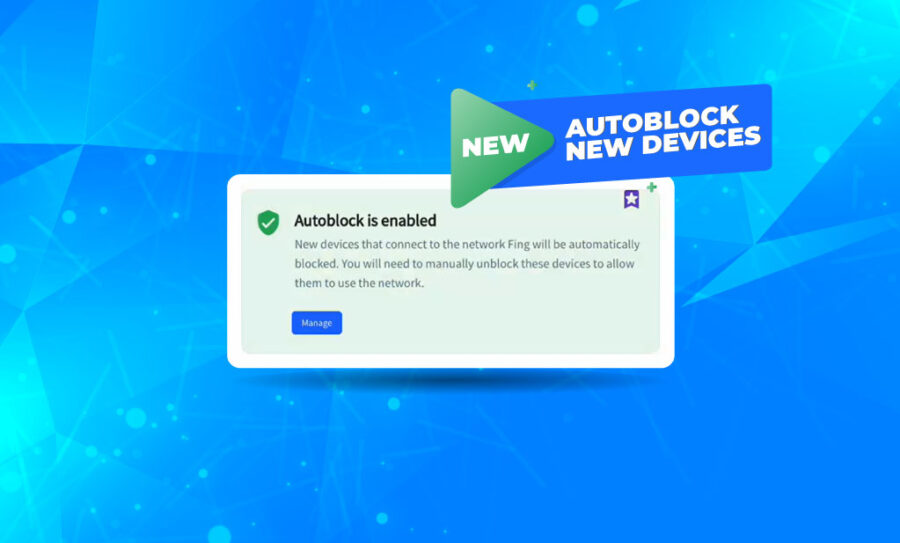
- Take full control. With Fing’s Premium and Professional plans, you can go a step further and block unknown or unwanted devices from your network entirely. You’re no longer just watching – you’re actively managing who and what gets access.
- Change default credentials. On your router, on your smart devices, on everything. Use strong, unique passwords.
- Update firmware. Check your router manufacturer’s site and apply the latest update. Enable automatic updates where possible.
- Disable unnecessary services. Turn off UPnP, remote management, and WPS if you’re not actively using them.
- Segment your network. If your router supports it, put IoT devices on a separate VLAN or guest network so they can’t reach your primary devices.
Knowing how to scan your home network for vulnerabilities isn’t a skill reserved for IT professionals. With the right tools, it takes minutes – and the clarity it brings is well worth it.
See your network before someone else does
Hackers don’t need sophisticated exploits to compromise a home network. They rely on neglect – default passwords, forgotten devices, unpatched firmware, open ports. These aren’t edge cases. They’re the norm.
The best defense isn’t paranoia. It’s simply knowing what’s on your network. Start with a free scan, see what’s actually connected, and decide how far you want to go from there. Fing gives you the tools for every step: free scanning to get started, 24/7 monitoring to stay informed, and advanced plans to take full control.
You might be surprised by what you find – and that curiosity is the first step to a more secure home.