You lock your front door at night. You close your car windows in a parking lot. You wouldn’t hand your wallet to a stranger on the street. But what about your digital life?
Every day, you share personal information online — passwords, banking details, photos, even your home address. Your Wi-Fi network connects dozens of devices, from laptops and phones to baby monitors and smart speakers. And most of the time, none of it is properly protected.
That’s where cybersecurity comes in.
If you’ve ever searched for “what is cybersecurity” and found yourself drowning in technical jargon, you’re not alone. Most guides on this topic are written for IT professionals and enterprise security teams — not for regular people who just want to understand what’s going on and how to stay safe.
This guide is different. Whether you’re looking for a clear cybersecurity definition, trying to understand why it matters, or wondering what it means for your home network, we’ll explain everything in plain English — no tech degree required.
Cybersecurity Definition: What Does It Actually Mean?
At its core, cybersecurity is the practice of protecting your devices, networks, and data from digital threats. Think of it as a security system for your digital life — it keeps your personal information safe from people who want to steal, misuse, or destroy it.
The official definition, according to CISA (the US Cybersecurity & Infrastructure Security Agency), is:
“The art of protecting networks, devices, and data from unauthorized access or criminal use and the practice of ensuring confidentiality, integrity, and availability of information.”
That sounds complex, so let’s translate it. Cybersecurity is built on three simple principles:
- Confidentiality — Only you (and people you authorise) can see your private information.
- Integrity — Your data stays accurate and hasn’t been tampered with by anyone.
- Availability — You can access your own information and devices whenever you need to.
When all three of these are working, your digital life is secure. When any one of them breaks down — someone reads your emails, alters your files, or locks you out of your own accounts — that’s a cybersecurity failure.
And here’s the thing most people don’t realise: cybersecurity isn’t just software or firewalls. It’s also your habits, your awareness, and the choices you make every day online. The strongest password in the world won’t help if you hand it over to a fake email.
Why Is Cybersecurity Important?
Cybersecurity might sound like a concern for big corporations and government agencies. But the truth is, cybercrime affects everyone — and its scale is staggering.
The Scale of the Problem
Cybercrime is now one of the largest economic threats on the planet. Here are a few numbers that put it in perspective:
- $4.88 million — the average cost of a single data breach in 2024, a 10% jump from the previous year and the highest figure ever recorded, according to the IBM Cost of a Data Breach Report.
- 67% of organizations reported an increase in cyber incidents over the past year, based on the Hiscox Cyber Readiness Report 2024.
These aren’t just corporate problems. Every major breach starts somewhere — a stolen password, an unsecured device, a careless click. And increasingly, that “somewhere” is a home network.
Why It Matters to You Personally
You don’t need to be running a Fortune 500 company to be a target. If you use the internet, you have something worth stealing:
- Your identity. Names, addresses, Social Security numbers, and dates of birth can be combined to open credit cards, take out loans, or commit fraud — all in your name.
- Your money. Online banking credentials, saved credit card details, and payment app logins are prime targets for attackers.
- Your privacy. Photos, messages, browsing history, even live camera feeds from smart home devices — all of it has value on the black market.
- Your home network. The average household now has over 15 connected devices. Each one is a potential entry point. And if you work from home, your employer’s sensitive data may be flowing through the same router your kids use to stream videos.
The bottom line: cybersecurity isn’t just an IT department’s job. It’s everyone’s responsibility — and it starts with understanding how it works.
How Does Cybersecurity Work?
You might think cybersecurity is all about software — antivirus programs, firewalls, complicated tools with complicated names. And yes, technology plays a big role. But effective cybersecurity actually rests on three pillars: people, processes, and technology. Let’s break each one down.
People — The Human Side
Here’s a fact that surprises most people: the overwhelming majority of successful cyberattacks involve some form of human error. Someone clicks a malicious link. Someone reuses the same password across ten accounts. Someone ignores that software update notification for the fifth time.
That’s not a criticism — it’s simply a reality. Attackers know that tricking a person is often far easier than breaking through a firewall. That’s why awareness is your single most powerful defense. When you know what to look for — a suspicious email, an unexpected login alert, an unfamiliar device on your network — you’re already ahead of most threats.
Processes — The Habits That Protect You
Cybersecurity isn’t a one-time setup. It’s a set of habits you build over time, like locking your door or buckling your seatbelt. Small routines make a huge difference:
-
- Updating your devices and apps when prompted — those updates often patch security holes attackers are actively exploiting.
- Backing up important files regularly, so a ransomware attack doesn’t mean losing everything.
- Reviewing your accounts and devices periodically — when was the last time you checked which devices are connected to your home Wi-Fi?
None of this is complicated. But consistency is what separates a secure household from a vulnerable one.
Technology — The Tools That Help
Technology is the third layer — the locks, alarms, and cameras of your digital life. Common cybersecurity tools include:
- Firewalls — they filter traffic coming into and going out of your network, blocking known threats.
- Antivirus software — it scans your devices for malicious programs and removes them.
- VPNs (Virtual Private Networks) — they encrypt your internet connection, making it harder for anyone to intercept your data.
- Network monitoring tools — they show you exactly what’s connected to your network and alert you to anything unusual. Tools like Fing, for example, let you scan your home network in seconds to spot unknown devices.
Think of it this way: technology is the lock on your front door. But people and habits are what make you remember to lock it every night.
The strongest cybersecurity strategy combines all three — aware people, good habits, and the right tools working together.
Types of Cybersecurity
Cybersecurity isn’t just one thing — it’s made up of several layers, each designed to protect a different part of your digital life. You don’t need to master them all, but understanding what they are helps you see where you might be vulnerable.
Network Security
Network security protects the infrastructure that connects your devices to each other and to the internet. For businesses, that means corporate networks and servers. For you, it means your home Wi-Fi router — the device that every phone, laptop, tablet, and smart gadget in your house relies on.
If your router isn’t properly secured, it’s like leaving your front door wide open. Anyone within range could potentially access your network, intercept your traffic, or use your connection for malicious purposes. Simple steps like changing your router’s default password and enabling WPA3 encryption can make a significant difference.
Endpoint Security
An “endpoint” is just a fancy word for any device that connects to a network. Your phone is an endpoint. So is your laptop, your tablet, your smart TV, and even your kid’s gaming console.
Endpoint security means making sure each of these devices is protected individually — through antivirus software, regular updates, screen locks, and careful app management. Think of it this way: even if your front door is locked (network security), you still want locks on every room inside (endpoint security).
Application Security
Every app you use — from your banking app to your email to your favorite social media platform — is a potential target. Application security focuses on keeping the software you rely on free from vulnerabilities that attackers could exploit.
For most people, this comes down to three things: keep your apps updated (developers patch security holes constantly), only download apps from official sources (like the App Store or Google Play), and be mindful of the permissions you grant. Does a flashlight app really need access to your contacts?
Cloud Security
When you store photos in Google Photos, files in Dropbox, or passwords in iCloud, that data lives “in the cloud” — on someone else’s servers, accessible over the internet. Cloud security is about making sure that data stays private and protected.
The cloud providers handle a lot of the heavy lifting on their end, but you’re still responsible for your side of the deal: using strong, unique passwords, enabling two-factor authentication, and being careful about what you share and with whom.
IoT and Smart Home Security
This is where things get interesting — and where most people are far more exposed than they realize.
IoT stands for “Internet of Things,” and it refers to all the smart devices in your life: security cameras, voice assistants, smart thermostats, robot vacuums, connected doorbells, even smart refrigerators. These devices make life more convenient, but they also create new entry points into your network.
The problem? Many IoT devices ship with weak default passwords, rarely receive security updates, and have limited built-in protection. A compromised smart camera doesn’t just put that one device at risk — it can give an attacker a foothold into your entire home network.
Here’s a question worth asking: do you know how many devices are connected to your home network right now? Most people don’t. And that lack of visibility is exactly what makes IoT devices such an attractive target.
Cybersecurity vs. Network Security — What’s the Difference?
This is a common point of confusion. Simply put:
- Cybersecurity is the big umbrella — it covers everything we’ve discussed so far: protecting devices, data, applications, networks, and people from digital threats.
- Network security is one layer underneath that umbrella — it focuses specifically on protecting the infrastructure that connects everything together.
Think of cybersecurity as your entire home security system: locks, alarms, cameras, motion sensors, and good habits. Network security is the fence around your property — important, but just one part of the picture.
Common Cybersecurity Threats (With Real-World Examples)
Knowing how cybersecurity works is one thing. Knowing what you’re up against is another. Here are the most common threats — and what they actually look like in practice.
Phishing
Phishing is the single most common type of cyberattack, and it’s deceptively simple. An attacker sends you an email, text message, or direct message that looks like it’s from someone you trust — your bank, a delivery company, a streaming service — and tricks you into clicking a link, entering your password, or downloading a file.
What it looks like: You receive a text saying “Your package could not be delivered. Click here to reschedule.” The link takes you to a fake website that looks exactly like a real courier’s site, where you’re asked to enter your personal details.
How to protect yourself: Always check the sender’s actual email address or phone number (not just the display name). If something feels urgent or unexpected, go directly to the company’s official website rather than clicking any link.
Malware
Malware — short for “malicious software” — is any program designed to harm your device, steal your data, or take control of your system without your knowledge. It’s a broad category that includes viruses, trojans, spyware, and more.
What it looks like: You download what appears to be a free PDF converter from an unofficial website. It works as expected, but in the background it’s quietly logging your keystrokes and sending your passwords to an attacker.
How to protect yourself: Only download software from trusted sources. Keep your antivirus software active and up to date. And be especially cautious with email attachments from unknown senders.
Ransomware
Ransomware is a particularly nasty form of malware that encrypts your files and demands payment — usually in cryptocurrency — to unlock them. Paying the ransom doesn’t guarantee you’ll get your data back, and it funds further criminal activity.
What it looks like: You open your laptop one morning and find that all your files — photos, documents, everything — are locked. A message on your screen demands $500 in Bitcoin within 48 hours, or your files will be permanently deleted.
How to protect yourself: Back up your files regularly to an external drive or a separate cloud service. This way, even if ransomware strikes, you have a clean copy of everything. And never open suspicious attachments or links.
Man-in-the-Middle Attacks
A man-in-the-middle (MITM) attack happens when someone secretly intercepts the communication between you and a website or service. The attacker can eavesdrop on your activity, steal login credentials, or even alter the data being exchanged — and you’d never know it was happening.
What it looks like: You connect to a free, unprotected Wi-Fi network at a coffee shop. Without realizing it, an attacker on the same network intercepts the data you send to your bank’s website, capturing your login information.
How to protect yourself: Avoid entering sensitive information on public Wi-Fi. Use a VPN to encrypt your connection when on untrusted networks. And at home, make sure your Wi-Fi is encrypted and your router firmware is up to date — because MITM attacks can happen on poorly secured home networks too.
Social Engineering
Social engineering is less about technology and more about human psychology. Attackers manipulate people into revealing confidential information, granting access, or taking actions that compromise security. Phishing is actually a form of social engineering, but the category is much broader.
What it looks like: You get a phone call from someone claiming to be from your internet provider’s “security department.” They say they’ve detected unusual activity on your account and need your login credentials to “verify your identity.” They sound professional, they know your name, and they create a sense of urgency — all classic social engineering tactics.
How to protect yourself: No legitimate company will ever ask for your password over the phone or via email. If someone contacts you about a security issue, hang up and call the company directly using the number on their official website.
Cybersecurity at Home — Where Most Guides Stop (And We Don’t)
If you’ve read this far, you may have noticed something: most cybersecurity advice is written for businesses. It talks about corporate firewalls, enterprise security teams, and compliance frameworks. But what about your network — the one in your living room?
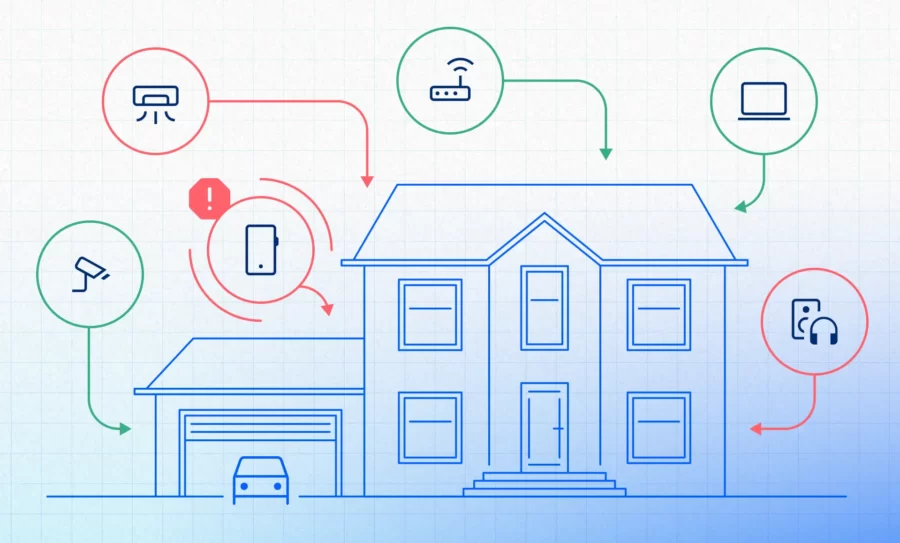
Your home network is the digital backbone of your daily life. It connects your laptop, your phone, your smart TV, your doorbell camera, your voice assistant, and maybe even your washing machine. The average household now has over 15 connected devices — and every single one is a potential entry point for an attacker.
Here’s what makes home networks especially vulnerable:
- Default settings. Most routers ship with factory-set passwords and configurations that are well known to attackers. If you’ve never changed yours, you’re essentially leaving the key under the doormat.
- Invisible devices. That smart plug you set up two years ago? The old tablet your kids stopped using? They’re likely still connected — and still vulnerable. You can’t protect what you can’t see.
- Blurred boundaries. If you work from home — even occasionally — your employer’s sensitive data is flowing through the same network your family uses to stream movies and play games. A compromised home network can become a corporate security incident.
- No IT department. At work, there’s usually someone responsible for security. At home, that someone is you.
This is exactly why we built Fing. Fing gives you the visibility you need to take control of your home network — no technical expertise required. Here’s how it works:
- Fing Mobile (Android and iOS) — Scan your network in seconds and see every connected device, from laptops and phones to smart bulbs and baby monitors.
- Fing Desktop (Windows and macOS) — Monitor your network from your computer with a better device recognition, richer interface, deeper insights, and additional security features.
- Fing Agent — Install it on a device that’s always on (like a Raspberry Pi or a NAS) for 24/7 continuous network monitoring — even when you’re away from home.
All three tools let you discover unknown devices and identify potential intruders. But if you want to go further, Fing subscriptions unlock advanced security features like real-time alerts, Internet access control and block and router vulnerability checks.
The first step to protecting your home network isn’t buying expensive software or getting a degree in cybersecurity. It’s knowing what’s there — and staying informed when something changes.
Quick Answers to Common Cybersecurity Questions
Still have questions? Here are the ones we hear most often.
What is cybersecurity in simple terms?
Cybersecurity is the practice of protecting your devices, accounts, and personal information from digital threats. It includes the tools you use (like antivirus software and firewalls), the habits you build (like updating your devices and using strong passwords), and the awareness you develop (like recognizing a phishing email). In short, it’s your defense system for life online.
Why is cybersecurity important for everyone — not just businesses?
Because everyone is a target. If you have an email address, a bank account, or a Wi-Fi network, you have something worth stealing. Cybercriminals don’t just go after corporations — they target individuals for identity theft, financial fraud, and access to home networks that may connect to dozens of devices. Cybersecurity is how you protect what’s yours.
How do I know if I’ve been hacked?
There are several warning signs: unexpected password reset emails, unfamiliar charges on your accounts, devices running slower than usual, apps or programs you don’t remember installing, and — importantly — unknown devices appearing on your home network. A network scanning tool like Fing can reveal if unauthorized devices are connected to your Wi-Fi — one of the most common and overlooked signs of compromise. For ongoing protection, Fing Agent monitors your network 24/7 and alerts you in real time when something suspicious appears.
Can my home network be hacked?
Yes — and it’s more common than most people think. If your router still uses its default password, if your Wi-Fi encryption is outdated, or if you have unpatched IoT devices connected, your network is vulnerable. The good news is that most home network attacks rely on basic misconfigurations that are straightforward to fix once you know they exist. Tools like Fing help you identify and control what’s happening on your network. For a deeper look at what attackers look for, read our guide on what hackers see on your home network.
What’s the difference between cybersecurity and antivirus?
Antivirus software is one tool within cybersecurity — it scans for and removes malicious software on a specific device. Cybersecurity is the whole strategy: it includes antivirus, but also firewalls, network monitoring, encryption, secure passwords, safe browsing habits, and more. Relying on antivirus alone is like locking your front door but leaving every window open.
Do I need cybersecurity if I only use the internet at home?
Absolutely. In fact, home users can be more vulnerable than businesses because they typically lack the dedicated security teams and enterprise-grade tools that organizations use. Your home network connects to your bank, your email, your personal files, and your family’s devices. Protecting it isn’t optional — it’s essential. Learn more about the threats facing your home network.
Cybersecurity Starts at Home
Cybersecurity can feel overwhelming — a world of firewalls, encryption protocols, and technical acronyms. But at its heart, it’s about something very simple: keeping your digital life safe.
You don’t need to be an expert. You don’t need expensive enterprise software. You just need to understand the basics — which, if you’ve made it this far, you already do.
You know what cybersecurity means. You know why it matters. You know what the common threats look like and how to spot them. And most importantly, you know that it all starts at home, with the network you and your family rely on every day.
The single most important step you can take right now? Find out what’s on your network. Because you can’t protect what you can’t see.